

Table of Contents
- Why Manual Payroll Processing Fails Ontario Employers
- Payroll Processing Alternatives: Software, Outsourcing, and Hybrid Models
- Payroll Compliance Requirements for Small Business
- Ontario Employment Standards Act: Pay Stub and Record-Keeping Rules
- Vacation Pay Accrual and Statutory Holiday Rules
- Income Tax Withholding and CRA Compliance
- CPP and EI: Contribution Limits and Rates
- WSIB Coverage and Reporting
- Employer Health Tax (EHT)
- T4 Slips and Year-End Reporting
- Records of Employment (ROE)
- The Compliance Risk of Manual Processing
- Benefits of Outsourcing Payroll Services
- Cost of Payroll Processing Services: What to Expect
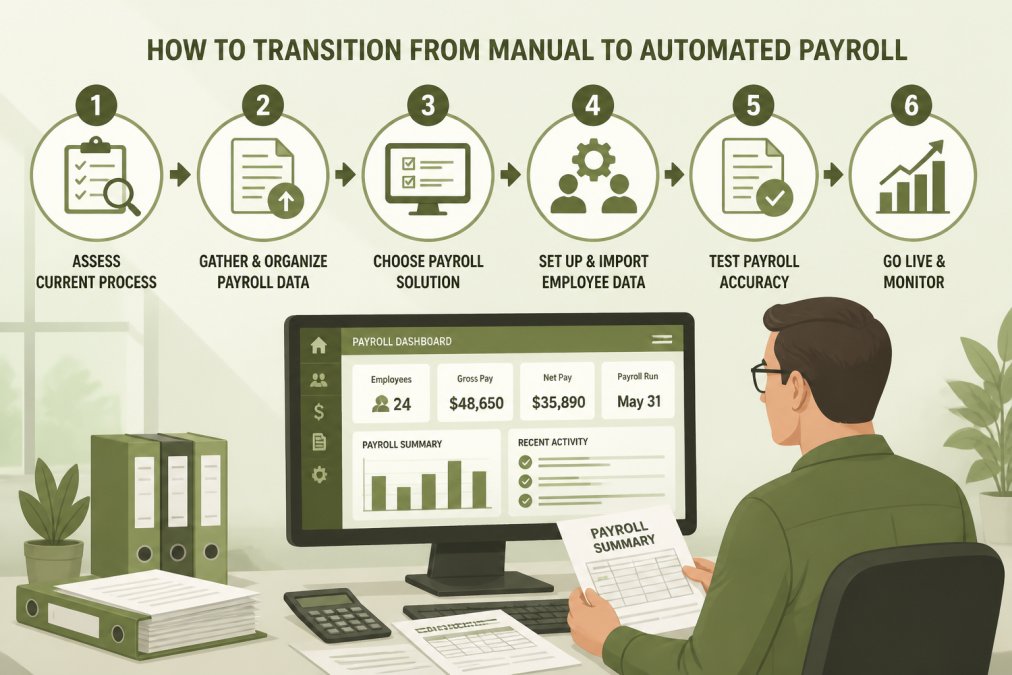
- How to Transition from Manual to Automated Payroll
- Pre-Transition: Audit and Prepare Your Data
- Parallel Run: Test Before Going Live
- Timing: Avoid Mid-Cycle Switches
- Employee Communication: Transparency Prevents Confusion
- Go-Live: First Three Pay Cycles Are Critical
- Historical Records: Archive, Don’t Discard
- Common Transition Pitfalls and How to Avoid Them
- Comparison of Top Payroll Solutions for Ontario Employers
- Frequently Asked Questions
Last Updated: September 24, 2026

Why Manual Payroll Processing Fails Ontario Employers
Manual payroll processing creates friction that grows with every hire. You’re managing CPP contributions, EI premiums, income tax withholding, WSIB reporting, and Employer Health Tax (EHT) simultaneously. Miss a deadline or miscalculate a deduction, and you face CRA penalties and interest.
Errors compound, employees lose trust when pay stubs are late or amounts are wrong, and you lose focus on what grows your business.
Manual processing doesn’t scale. Ten employees, biweekly runs, statutory holidays, vacation accruals, and contractor payments quickly become unmanageable.
A single miscalculation in source deductions can trigger CRA audits, penalties, and personal liability for unpaid remittances. Manual systems have no built-in error checking.
Payroll Processing Alternatives: Software, Outsourcing, and Hybrid Models
Ontario employers have three core paths away from manual payroll processing. Each trades control, cost, and complexity differently.
Automated Payroll Software Solutions
Payroll software automates tax computations, remittances, T4 slips, and Records of Employment. You input hours or salary, approve the run, and direct deposit happens on schedule.
Platforms like Wagepoint and Payworks are designed for Ontario compliance and integrate with QuickBooks Online or Xero, flowing payroll data directly into your books.
You’re still responsible for accuracy, garbage in, garbage out applies to payroll software just as much as spreadsheets.
Best for: Teams with 2-15 employees, businesses comfortable managing their own compliance, organizations that want to keep payroll in-house but need speed and accuracy.
Most payroll software offers a trial period. Use it to process one full pay cycle before committing.
Outsourced Payroll Services
Outsourcing means handing payroll entirely to a third-party provider. You send hours or salary data; they process payroll, file remittances, and handle year-end reporting. HK Accounting manages weekly, biweekly, or monthly processing with direct deposit and CRA remittances filed on schedule.
The advantage is simplicity and liability transfer. If a filing is late or a calculation is wrong, the provider covers penalties and interest. You get fixed monthly cost, unlimited support, and backup coverage.
The trade-off is cost and control. You depend on a third party for a critical business function.
Best for: Businesses with 3-20 employees, owners with limited accounting knowledge, teams that want compliance off their plate entirely, organizations that value speed and peace of mind over cost minimization.
Hybrid Approach: In-House with Software Support
Some businesses run payroll using software but outsource year-end compliance. An accountant handles T4 preparation, WSIB reporting, and CRA correspondence once per year.
Best for: Teams with 5-25 employees, businesses that have some accounting capability but want expert oversight, organizations that want to balance cost and control.
Payroll Compliance Requirements for Small Business
Ontario employers operate under a multi-layered compliance framework. Missing a requirement can trigger CRA penalties, Ministry of Labour investigations, or employee claims.
Ontario Employment Standards Act: Pay Stub and Record-Keeping Rules
The Ontario Employment Standards Act (ESA) sets baseline rules for how you must pay employees and what records you must keep. Every pay stub issued in Ontario must include:
- Employee name and SIN
- Pay period dates
- Gross pay
- Each deduction itemized separately (income tax, CPP, EI, union dues, benefits, garnishments, etc.)
- Net pay
- Year-to-date totals for gross pay, tax withheld, and each deduction
Many small business owners using spreadsheets generate pay stubs that omit YTD totals or lump deductions together, violating the ESA.
Vacation Pay Accrual and Statutory Holiday Rules
Employees are entitled to a minimum of two weeks’ vacation per year (or 4% of gross earnings). Vacation pay accrues with every paycheque and must be paid out immediately upon termination.
Statutory holidays in Ontario include New Year’s Day, Family Day, Good Friday, Victoria Day, Canada Day, Civic Holiday, Labour Day, National Day for Truth and Reconciliation, Thanksgiving, Christmas, and Boxing Day.
Income Tax Withholding and CRA Compliance
You’re required to withhold income tax from every paycheque based on the employee’s Form TD1. Remittance frequency depends on payroll size: quarterly if under $15,000/month, monthly if $15,000-$100,000, and more frequently if over $100,000.
CPP and EI: Contribution Limits and Rates
CPP contributions are mandatory for employees aged 18-70 earning above $3,500 annually. The 2024 employee rate is 5.95% of pensionable earnings up to $3,867.50/month; employers match.
WSIB Coverage and Reporting
Most Ontario employers must register with WSIB and report payroll annually. Underreporting triggers audits and back premium assessments.
Employer Health Tax (EHT)
If payroll exceeds $450,000 annually, you must pay Employer Health Tax at 1.95% of payroll above the threshold, remitted quarterly.
T4 Slips and Year-End Reporting
By end of February, you must issue T4 slips showing gross income, income tax withheld, CPP contributions, EI premiums, and taxable benefits.
Records of Employment (ROE)
You must issue a Record of Employment to Service Canada within five calendar days of the last paycheque. Late issuance can disqualify employees from EI benefits.
The Compliance Risk of Manual Processing
Compliance requirements are interconnected. A CPP error affects year-end remittances. A missing deduction violates the ESA. An incorrect vacation accrual creates termination liability. Manual systems have no error checking.
Ontario employers are personally liable for unremitted source deductions. If your business can’t pay the CRA, the CRA can pursue you personally for the amount owing.
Benefits of Outsourcing Payroll Services
Outsourcing eliminates the compliance burden. An external provider takes responsibility for accuracy and timeliness.
Cost of Payroll Processing Services: What to Expect
Software solutions typically charge per employee per month or per pay run. Outsourced services usually offer fixed monthly or per-employee pricing, with additional fees for year-end reporting or WSIB submissions.
How to Transition from Manual to Automated Payroll
Switching from manual payroll to software or outsourced services is high-risk. A botched transition can delay paychecks, create duplicates, or lose data.
Pre-Transition: Audit and Prepare Your Data
Conduct a complete payroll data audit. Gather employee names, addresses, SINs, pay rates, deductions, and year-to-date totals. Check for inconsistencies, mismatched SINs, duplicates, or missing deduction history.
Parallel Run: Test Before Going Live
Run a parallel payroll cycle in both systems. Gross pay, deductions, net pay, and employer contributions must match exactly.
Timing: Avoid Mid-Cycle Switches
Schedule transition for the first day of a new pay period, never mid-cycle.
Employee Communication: Transparency Prevents Confusion
Notify employees at least one week before transition. Explain changes and provide a contact person for questions.
Send sample pay stubs to employees for verification.
Go-Live: First Three Pay Cycles Are Critical
On the first live pay run, hold deposits for 24 hours. Spot-check three to five employee records against previous pay stubs before releasing payment.
Historical Records: Archive, Don’t Discard
Archive all manual payroll records. You’re legally required to keep them for at least six years. Store securely with access controls.
Common Transition Pitfalls and How to Avoid Them
Ask your new provider or software vendor for a transition checklist. Most have processed hundreds of switches and can guide you through common issues.
A well-planned switch eliminates manual payroll work, reduces errors, and gives you confidence that your compliance obligations are being met.
Comparison of Top Payroll Solutions for Ontario Employers
| Solution | Best For | Key Features | Compliance Coverage |
|---|---|---|---|
| HK Accounting (Outsourced) | Full payroll handoff | Fixed monthly pricing, unlimited support, backup coverage, CRA remittances filed on schedule | CPP, EI, income tax, WSIB, EHT, T4 slips, ROE |
| Wagepoint | DIY software users | Canadian-focused, intuitive interface, direct deposit, automated tax calculations | CPP, EI, income tax, T4 filing |
| Payworks | Growing teams needing HR integration | Time tracking, employee portal, benefits administration, scalable modules | CPP, EI, income tax, WSIB, T4 filing |
| QuickBooks Payroll | Businesses using QuickBooks | Seamless accounting integration, automated filings, mobile access | CPP, EI, income tax, T4 filing |
| ADP Canada | Enterprise-grade security | Comprehensive reporting, multi-platform access, extensive integrations | CPP, EI, income tax, WSIB, T4, ROE |

The comparison shows a clear split: software solutions give you control but require you to manage the process. Outsourced services like HK Accounting can remove that burden.
Before choosing a provider, ask whether they cover penalties and interest if they miss a deadline. This protection is worth the cost difference alone.
Frequently Asked Questions
What are the main risks of manual payroll processing for small businesses?
Manual payroll processing exposes businesses to calculation errors, missed CRA remittance deadlines, incorrect source deductions, and compliance violations under Ontario Employment Standards Act rules. A single mistake in CPP or EI calculations can trigger CRA assessments and penalties. Manual systems also lack audit trails, making it difficult to prove compliance during reviews. Data security risks increase when payroll information is stored in spreadsheets or paper files rather than encrypted systems.
How do automated payroll systems ensure compliance with CRA requirements?
Automated payroll software maintains updated tax tables, calculates CPP contributions and EI premiums correctly, and files remittances on schedule with CRA. These systems generate accurate T4 slips, Records of Employment, and year-end reporting automatically. They track statutory holidays, overtime rules under Ontario Employment Standards Act, and WSIB reporting requirements. Most systems include built-in compliance calendars that alert you to filing deadlines, reducing the risk of late submissions.
Is outsourcing payroll more cost-effective than manual processing?
Outsourcing payroll can be more cost-effective than the hidden expenses of manual processing when you factor in staff time, error correction, and compliance risk. Outsourced services provide fixed monthly pricing with unlimited support, which can help eliminate overtime and training costs. For businesses with 1-10 staff, outsourcing often proves more economical than hiring dedicated payroll personnel.
What features should I look for in a payroll processing alternative?
Look for Ontario-specific compliance (CPP, EI, income tax, WSIB, EHT calculations), direct deposit capability, automated CRA remittance filing, T4 and ROE generation, integration with accounting software like QuickBooks or Xero, and employee self-service portals. Ensure the provider offers backup support during staff absences, maintains data security with encryption, and provides responsive customer service. For growing businesses, scalability and HR features alongside payroll are important considerations.
How long does it take to transition from manual payroll to an automated system?
Transitions can take several weeks when working with a professional payroll provider. The process involves gathering historical payroll records, setting up employee profiles in the new system, transferring CRA authorizations, and testing a pay cycle before going live. Providers typically handle data migration and CRA account transfers on your behalf. The key is ensuring accurate historical records and employee information are captured upfront to prevent errors in the first automated pay run.